
Subtle!
October 16th, 2003
Subtle! The iTunes site switches
out all the screenshots based on the OS it detects your browser is using:
 Fig. 1. As seen from a Mac. |
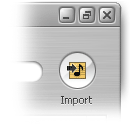 Fig. 2. As seen from a PC. |
Seeing the screenshots side-by-side helps point out the differences: Lucida,
Apple’s new OS font, used on the left, and Tahoma used on the right;
Windows-style minimize/maximize/close icons on the right (however, the
maximize icon acts like the OS X “zoom” icon, switching iTunes into and out of
its compact UI mode); the brushed-metal textures are slightly different (the
PC version seems to be gamma-corrected!).