Twitter’s “Don’t Click” prank, explained
[This information originally appeared here, where I also included an inert copy of the attack code.]
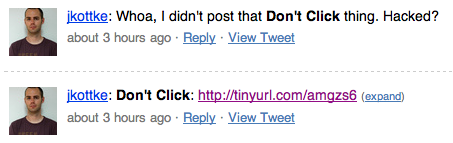
Fig. 1. A common sequence of tweets this morning.
Quick explanation of today’s “Don’t Click” attack
This viral Twitter prank uses a pretty standard trick to get you to post something to Twitter, using no JavaScript and only a very little bit of CSS. It requires only that you’re first logged in to twitter.com (and that your browser’s fonts are pretty close to standard so that things line up correctly).
Fig. 2. The “Don’t Click” page.
The attack page creates a button labeled “Don’t Click” that does nothing at all, but it also loads twitter.com in an <IFRAME> directly on top of the button. That IFRAME is then made completely transparent using CSS.
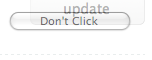
Fig. 3. The hidden IFRAME, exposed.
When you click the button, you’re actually clicking on the (now invisible) ‘Update’ button on Twitter’s web interface instead; assuming you’re logged in to Twitter, you’ll immediately post whatever’s in the form input box. Thanks to Twitter’s ?status= URL feature (that allows Twitter to be pre-loaded with a message), it’s very easy for the attacker to drop the following message in:
Don’t Click: http://tinyurl.com/amgzs6
That TinyURL expands to http://www.umoor.eu/blog/yes-we-can.php, the attack page; in this way your followers are also enticed to propagate the “attack” (which has proven quite successful).
No accounts were compromised by this prank; you don’t need to change your Twitter password. For more information, check out the source to this page, which includes the attack (but makes the Twitter IFRAME partially visible so you can see it; it also puts another <DIV> on top of it to protect you from accidentally clicking the “Submit” button).
See also: an explanation (en Français) by the author of this attack, originally launched in January 2009. (There is some speculation that the code was taken directly from James Padolsey’s proof-of-concept, owing to the similarity of the code.)
As of 1:40PM EST, twitter.com is using some JavaScript to try to detect when it’s being loaded in an IFRAME:
if (window.top !== window.self) {
window.top.location.href = window.self.location.href; }
If you try to load Twitter in an IFRAME you’ll find the browser redirected to Twitter automatically (in this case, you’ll never have an opportunity to click on “Don’t Click”). I’ve therefore removed the attack from this page, but you can still see it if you view source.
20 responses
[...] a better description of how the attack worked than I could hope to write, see Daniel Sandler’s page. In brief, it was a tiny, simple web page with a button labelled “Don’t Click!”; [...]
comment posted at 4:03 pm on 12 Feb 2009
The frame-busting technique is not a complete solution. The example linked from my post doesn’t redirect you to Twitter if you’re using Firefox or IE:
http://shiflett.org/blog/2009/feb/twitter-dont-click-exploit
comment posted at 4:51 pm on 12 Feb 2009
[...] Here’s and explanation of how it works: Twitter’s “Don’t Click” prank, explained. [...]
comment posted at 4:56 pm on 12 Feb 2009
Thanks
It was scary…!
comment posted at 7:04 pm on 12 Feb 2009
[...] clicking the link, through the clever use of a hidden iframe and a bit of CSS (also known as clickjacking), the same message is reposted from your Twitter account. Before long, [...]
comment posted at 11:44 pm on 12 Feb 2009
Of course, if you used the NoScript Firefox extension ( http://noscript.net/ ), you’d be protected from this and similar attacks. I’m just as much of a clicking monkey as everyone else who got hit, but noscript popped up an alert to let me know what was going on.
comment posted at 12:05 am on 13 Feb 2009
I published a screencast on Vimeo immediately after I saw the spread of “Don’t Click” tweets by the people I follow. The screencast shows people visually what you’re explaining in this post.
http://vimeo.com/3189642
comment posted at 2:55 am on 13 Feb 2009
[...] inversa o harás lo que te digo que no hagas. Varios cayeron ayer en el clickjacking que se extendió como la pólvora en twitter, una broma molesta que no causa mayor daño, y que por [...]
comment posted at 4:54 am on 13 Feb 2009
[...] are some articles explaining how this trick worked in French and in English here and [...]
comment posted at 8:14 am on 13 Feb 2009
No wonder my firefox script blocking plugin was flipping out.
comment posted at 9:44 am on 13 Feb 2009
If this happened to any other site, it wouldn’t be called a “prank.” Twitter has to be one of the worst designed webapps. Only on twitter do users get excited to see a 404 page with the “fail whale.” Twitter is nothing but fail…
comment posted at 10:32 am on 13 Feb 2009
Clever! I didn’t click anything (apparently I never noticed anyone in my list doing so, except to say “Don’t Click the Don’t Click”, but it does take advantage in a way that shouldn’t be doable. (I use Twitterfox, which wouldn’t have been susceptible as it’s not logged into the browser page itself, but still.)
comment posted at 11:17 am on 13 Feb 2009
Maybe people will learn not to click buttons that say “Don’t click” on them.
comment posted at 8:24 pm on 13 Feb 2009
On the Internet? Unlikely!
comment posted at 11:07 pm on 13 Feb 2009
[...] XSS is the most common form of attack on the Web and can take on malicious behavior, including phishing, cookie/session hijacking and redirecting users to an unsafe website. It’s estimated that well over half of all existing websites have some form of XSS vulnerability, including social media giants like MySpace and Twitter (recently exemplified by the “Don’t Click” prank on Twitter). [...]
comment posted at 7:01 am on 01 Apr 2009
[...] XSS is the most common form of attack on the Web and can take on malicious behavior, including phishing, cookie/session hijacking and redirecting users to an unsafe website. It’s estimated that well over half of all existing websites have some form of XSS vulnerability, including social media giants like MySpace and Twitter (recently exemplified by the “Don’t Click” prank on Twitter). [...]
comment posted at 6:11 pm on 11 Apr 2009
Overlaid, transparent buttons? What idiot thought there was a use for such a thing?
comment posted at 7:08 am on 18 Jun 2009
[...] fallen prey to a mild clickjacking exploit on Twitter myself! It really does happen — and it’s not hard to [...]
comment posted at 6:54 am on 19 Jun 2009
[...] fallen prey to a mild clickjacking exploit on Twitter myself! It really does happen — and it’s not hard to [...]
comment posted at 1:09 am on 06 Aug 2009
[...] that read “Don’t click me”. Here is an examples for Jason Kottke’s stream:Twitter’s “Don’t Click” prank, explainedHuman nature being what it is, many people clicked the button, which seemingly did nothing. What it [...]
comment posted at 11:03 am on 14 Jan 2010