Adobe Unreadable
I just updated my copy of Adobe Reader so I’d be able to add fancy annotations to PDFs (one of the side-effects of your advisor being halfway across the country is that it’s harder to pass marked-up drafts back and forth).
I officially hate it in all ways. RAM eater? Check. (The reader takes up gobs of memory as you’d expect, and even the Safari plugin chews up an additional 40MB when it first loads.) Interface? Uglier than the dog poop left in my parking spot by the neighbors in the next building.
But what’s really driving me nuts is the text rendering. This is Adobe, for pete’s sake—you’d think they’d have gotten it down! But, no, the anti-aliased type display is a disaster. The ClearType (or CoolType, or MyType, or ZOMGtyp3!, or whatever Adobe calls it) is worse—a plague visited upon the Earth. There’s also some kind of horrible spasm going on inside the hinting engine, visible especially at small point sizes:

(a)

(b)
Fig. 1. A block of graphics and type in Adobe Reader (a) and Apple Preview (b). The Preview rendering occasionally drops half-pixels along straight lines, in slavish service to the underlying shapes; Reader, on the other hand, is so obsessed with screen pixel boundaries that lines seem to jump all over the place (note especially letters like “i” and “t” that have both ascenders and x-height features).
So I’m thinking I’ll shelve Reader until I absolutely positively need to do some annotation that can’t be handled by Preview. But does anyone know of an easy, reversible way to switch on and off Reader’s control of PDF viewing in Safari? (Online documentation seems to indicate that Reader will “heal” Safari if it notices that the PDF viewer plugin has been deleted.)
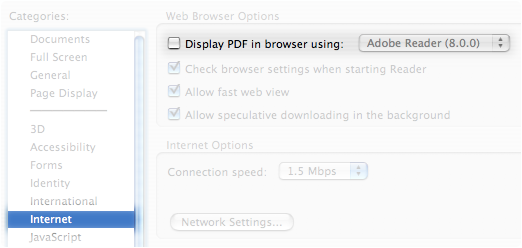
Update 2/1: Well, at least Adobe lets you turn off the Web plugin (in the Reader app’s preferences):